Support my work on Patreon

If you like my work, please consider to help my growing family with a little financial support through my Patreon creator page.


Alternatively, you can leave a one-time donation via PayPal using the Donate button below.

Total Pageviews

Friday, June 7, 2019

Relight, a "digital fill-in flash" filter

This post an update about the work I am doing on shadows/highlights compression and tone mapping. It describes a new filter that works as a sort of "digital fill-in flash", that brightens the dark areas of an image while having a minor effect on the highlights.

Here is a preview of the filter in action (original image of the left, "relight" filter on the right with the corresponding tool dialog opened):

(image source: https://discuss.pixls.us/t/playraw-raw-challenge-backlit/1676)

Friday, April 26, 2019

New shadows/highlights and tone-mapping tools

This post is still work in progress!!!

----------------

Introduction

This post describes the new shadows/highlights adjustment tool that I have introduced in PhotoFlow, and gives some implementation details in case someone would like to port the code to some other image editor.

The shadows/highlights adjustment can be split in the following steps:

  1. the input pixels are converted from linear RGB to log grayscale, to create a log-luminance (LL) mask:
    LL = log10(lumi(RGB))
  2. the LL mask is blurred with a guided filter pyramid (more on this below)
  3. the blurred LL mask is tone-mapped with an analytical function that rises the shadows and lowers the highlights (more on this below); an anchor parameter allows to define the splitting point between shadows and highlights regions
  4. the input RGB values are linearly scaled by the ratio of the blurred LL mask after/before the tone mapping

CSS image comparison slider test

Drag the black border ↔ pure Css

Credits:Original idea: solipsistaCP

Wednesday, November 7, 2018

New batch processing options for image export

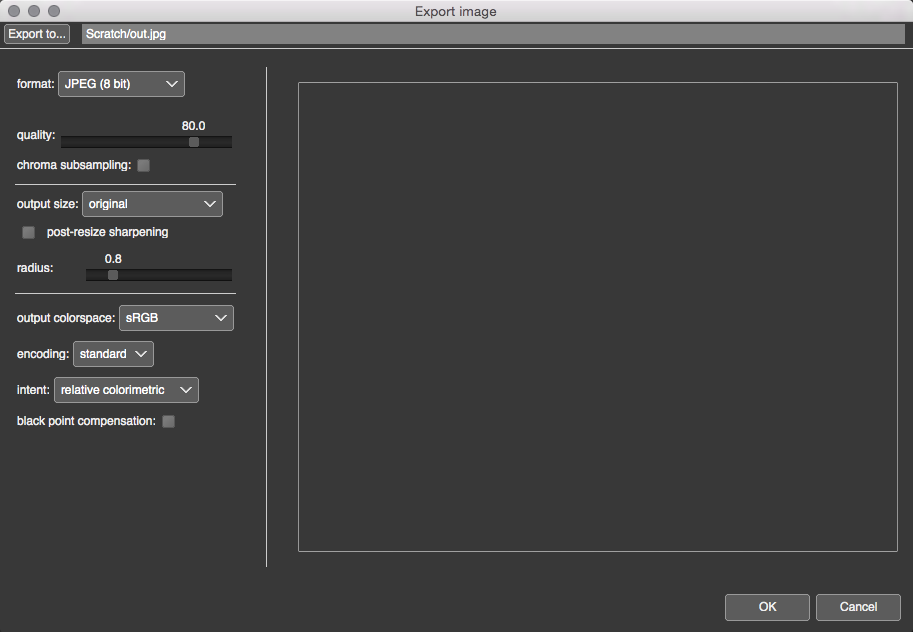
Image export options, and a corresponding image export dialog, have been implemented in PhotoFlow quite some time ago:


However, until now those options were not yet implemented in the batch processor. While introducing the image export options, I also had to partly change the way command-line parameters are passed to the batch processor.

As usual, up-to-date packages for Linux, MacOS and Windows 64 bits are available from here.

Wednesday, October 10, 2018

PhotoFlow - EXIF data info panel

I have just introduced a little but useful enhancement in the PhotoFlow gui: a panel showing the EXIF data of the image being edited. Here is an example:


The up-to-date pre-compiled packages are available as usual from GitHub: https://github.com/aferrero2707/PhotoFlow/releases/tag/continuous (you will have to select those created on 2018/10/10 or newer).

Enjoy!

Friday, September 14, 2018

Launch of crowd-funding campaign on Patreon

Dear PhotoFlow enthusiasts,
I have just launched a crowd-funding campaign on Patreon, with the goal of getting some support out of my FLOSS development activities.

Here is the link to the corresponding creator page: https://www.patreon.com/andreaferrero

Apart from the development of PhotoFlow, that you can follow on this blog and on the forum, I am providing AppImage packages and Continuous Integration support for other graphics-related FLOSS projects, namely:

If you like what I am doing and you find it useful, it would be great if you could consider a little donation. I do not have very ambitious goals regarding the crowd-funding campaign, and I am surely not going to adopt a philosophy of the kind "you only get it if you pay for it!". The work I am doing will continue regardless of the collected money.

Nevertheless, a little financial contribution will certainly help me to justify the spare time I am spending on FLOSS work!

Sunday, September 2, 2018

The new "editing mode" for interactive tools

It has been a while since I posted last time... meanwhile I have been silently working on PhotoFlow, adding new tools and improving the usability.

In this post I will explain how interactive tools (those who require mouse interaction in the preview area in order to set their parameters, like the crop tool) are working in the latest development versions.


Tuesday, August 8, 2017

PhotoFlow v0.2.8 has been released

I am happy to announce that version 0.2.8 of PhotoFlow is now available from the GitHub repository.


Pre-compiled packages are available for Linux (in AppImage format), OSX and Windows.

The full changelog as well as installation instructions can be found in the GitHub release page.

Monday, July 31, 2017

Getting ready for version 0.2.8

The past few months have been mostly devoted bug-hunting and general stability improvements, as well as some nice improvements here and there. The code is now basically ready for a new official release, so it is a good time to summarise the recent developments.

Pre-compiled packages are provided for LinuxOSX and Windows. In the Linux case, the package is distributed in the form of an AppImage that can be run on virtually any recent Linux distribution, without the need of installing extra dependencies.
The links will be updated in case new the packages get published.

Please help testing the code and give your feedback! If no major problem with the current code is reported, it will be used as the basis for the next v0.2.8 release.


Monday, February 27, 2017

PhotoFlow keyboard shortcuts

The latest versions of PhotoFlow comes with few handy keyboard shortcuts. The list of implemented shortcuts is still rather small and, more importantly, the shortcuts cannot (yet) be customized, however this is a first step toward a better usability of the program.

The currently available shortcuts are all related to operations with layers:


  • Ctrl+Shift+N: add a new layer
  • Ctrl+Shift+G: add a new layer group
  • Ctrl+Shift+D: delete the selected layer(s)
  • Ctrl+Shift+C: copy the selected layer(s) to the photoflow clipboard
  • Ctrl+Shift+X: cut the selected layer(s) to the photoflow  clipboard
  • Ctrl+Shift+V: paste the layer(s) from the photoflow  clipboard
  • Ctrl+Shift+O: open an existing preset (will be inserted above the selected layer)
  • Ctrl+Shift+S: save the selected layers as a preset
  • Ctrl+Shift+M: switch the current layer to "mask view mode"
  • Ctrl+Shift+L: switch the current layer to "layer view mode"


Under OSX, the Ctrl modifier key must be replaced with Cmd.

The complete and up-to-date documentation of keyboard shortcuts can be found at any time in the PhotoFlow wiki.

Thursday, February 23, 2017

How to run the PhotoFlow GIMP plug-in under Linux using the AppImage packages

Yesterday I have briefly described the new PhotoFlow GIMP plug-in. In this follow-up, I will show how to run GIMP and the PhF plug-in under Linux using the AppImage packages.

The latest GIMP and PhotoFlow AppImages can be downloaded respectively from here and here (you need to grab the most recent version). In the following I will assume that the AppImages have been downloaded into the $HOME/Applications folder, but any other folder on your filesystem is equally good...

In order to start the GIMP AppImage and let it find and use PhotoFlow for opening the RAW files and/or run as a filter on the existing layer data, open a terminal and type the following:

    export PHOTOFLOW_PATH=$HOME/Applications/photoflow.AppImage
    $HOME/Applications/gimp.AppImage

Of course you need to replace the paths of the photoflow and gimp AppImages with their actual paths and full names on your system...

The first line with the environment variable assignment is used to tell GIMP where to look for the PhotoFlow executable. The second line starts GIMP from the AppImage. You can also pass a file name as parameter to the GIMP AppImage, just like with the standard GIMP. The PhF plug-in also allows to directly open .PFI files with GIMP, in case you need to do so...

Wednesday, February 22, 2017

The new PhotoFlow GIMP plug-in interface

Recently I have been working on a complete re-write of the PhotoFlow GIMP plug-in interface.

The new plug-in code is a simple wrapper that saves and loads the image data into temporary floating point TIFF files, and then invokes the standard photoflow executable with those TIFF files as parameters.  It also saves and retrieves the accompanying PFI files with the processing parameters that get stored in the GIMP layer meta-data.

Monday, October 10, 2016

Non-destructive Lab editing with GIMP and the PhotoFlow plug-in

Since a while PhotoFlow is also available in the form of a GIMP plug-in. It means that PhotoFlow can be used directly within GIMP, to open and process RAW images as well as to apply non-destructive editing to any GIMP layer.

The most simple way to use GIMP in combination with the PhotoFlow plug-in under Linux is to download and run the AppImage package that is hosted on the pixls.us web site. This screencast explains the details of how to run the GIMP AppImage and briefly introduces the tools that are provided with it.

One of the possibilities offered by the PhotoFlow GIMP plug-in is to apply non-destructive edits in Lab colorspace to any GIMP layer. The Lab colorspace (or better CIELab) is an alternative representation of the pixel data that, unlike RGB, separates the luminance information from the color information. It is therefore possible for example to adjust the luminance of the image without changing the color components, or to adjust the color saturation in a way that is more natural and pleasing than in RGB.

Let's see how this works in practice.

Monday, March 21, 2016

PhotoFlow version 0.2.6 released

A new PhotoFlow version 0.2.6 is out!

This new version comes with lots of new or improved features and an updated GUI, including a better layout of the filters controls and an handy lateral toolbox that provides shortcuts for some of the most commonly used filters:

The image in the preview area is courtesy of Andrea Katifes


Monday, December 7, 2015

New PhotoFlow version 0.2.5

A new PhotoFlow version 0.2.5 is out!

This version bring two new cool features that will make the creation of local masks even easier:

  • A path selection tool that creates a closed region by connecting user-defined control points with a spline curve. It also provides an optional smooth falloff edge for feathering the selection. The path selection tool is similar to the path mask in Darktable, and most of the source code is actually derived from Darktable.
    This tool is particularly useful to generate smooth layer opacity masks for local editing.
  • A smoothing option for the brush of freehand drawing tool, with an adjustable smoothness:

Monday, November 2, 2015

New PhotoFlow version 0.2.4 released

The next PhotoFlow version 0.2.4 is out!
This is a maintenance release, only providing bug fixes and no new features.
The complete changelog for version 0.2.4 can be found here.

Tuesday, October 27, 2015

New PhotoFlow version 0.2.3 released

The next PhotoFlow version 0.2.3 is out!
The source code, as well as OSX and Windows installers, are available from the github repository.
For Ubuntu users, the updated packages are available from the Highly Explosive PPA.
Updated archives for Arch Linux are also available from the github repository.

This new version includes several new features and improvements:


  • The list of available RAW demosaicing methods now includes the LMMSE algorithm, ported from RawTherapee. LMMSE is in many cases the optimal choice for noisy and/or high-ISO images.
  • Added new impulse noise reduction tool, based on the equivalent tool from RawTherapee
  • Added new perspective correction tool, based on the "keystone perspective correction" from Darktable.
  • A reset button is now available to restore the tools parameters to their default values

  • The complete changelog for version 0.2.3 can be found here.

    Sunday, October 4, 2015

    New PhotoFlow version 0.2.2 released

    The next PhotoFlow version 0.2.2 is out!
    The source code, as well as OSX and Windows installers, are available from the github repository.
    For Ubuntu users, an updated package will most likely be available in the next few days.

    This new version includes few major improvements:

    RGB histogram visualization
    An RGB histogram has appeared above the layer list, on the top-left part of the application window. The histogram shows the RGB values of either the merged output or the sticky layer, depending which one is activated in the GUI.

    Interactive editing of gradients shape
    It is now possible to modify the shape of an horizontal or vertical gradient by means of control points that are added and modified directly in the preview area. This new feature is accessible when the editing mode of the gradient tool is activated, as shown in the screenshot below.

    Saturday, September 19, 2015

    New PhotoFlow version 0.2.1 released

    The next PhotoFlow version 0.2.1 is out!
    The source code is available from the github repository, while OSX and Windows installers will be provided very soon through the same link.
    For Ubuntu users, an updated package will most likely be available in the next few days as well.

    PhotoFlow version 0.2.1 fixes a quite large number of issues related with the new GUI layout.
    However, a new release would be rather boring without new features! So there is a bunch of cool new things and improvements that have been added in this release.